 InfoPin
Answer shopper questions right on the product photo
InfoPin adds pins to your Shopify product images. A shopper hovers or taps a pin and reads a short note about that part of the product, without leaving the page.
Install on ShopifyFree plan available. No theme code to edit.
Try itHover or tap a pin on the backpack
See it in a real store
A 24-second walkthrough: placing pins in the editor, then the tooltips on a live product page.
How it works
Setup takes a few minutes and happens inside your Shopify admin.
Open a product in InfoPin
Your products load straight from Shopify. Pick one to see its images.
Click the image to place a pin
Drag a pin to move it. Positions are saved as percentages, so pins stay put on every screen size.
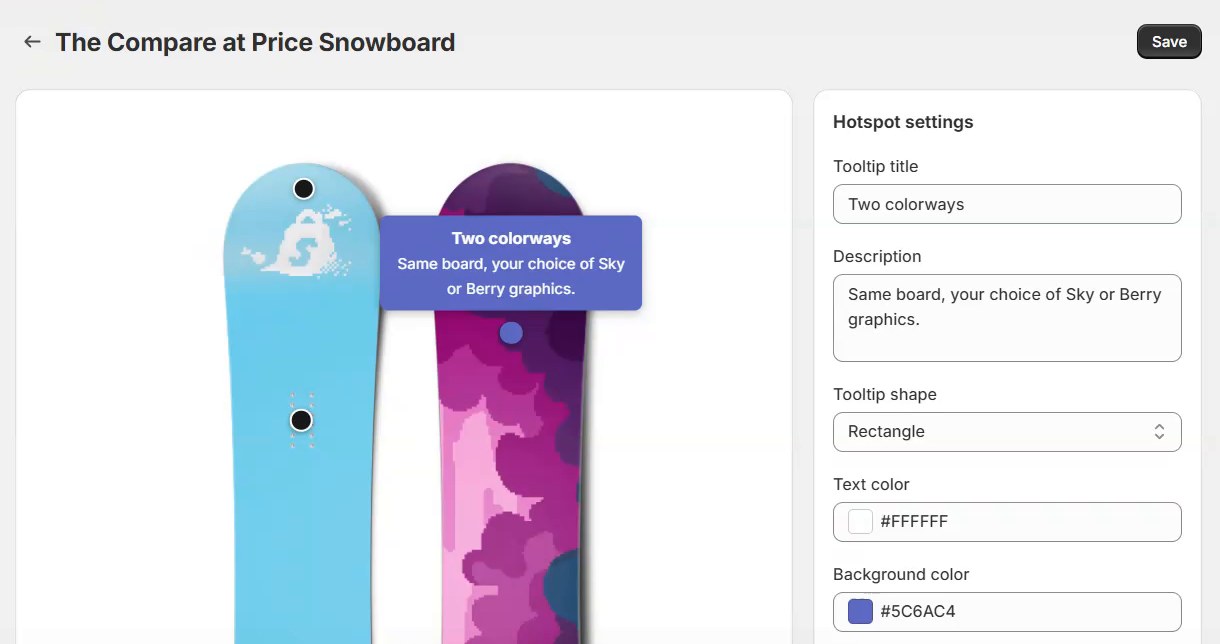
Write the note and pick a style
Give each pin a title and a short description, then choose its shape and colors.
Save, and turn on the app embed once
Pins appear on your product pages. Shoppers hover on desktop or tap on a phone.
What you get
- A visual editor
- Click to place, drag to adjust. A live preview shows the tooltip as you type.
- Works with your theme
- The widget finds your product images automatically. There is a selector fallback for unusual themes.
- Desktop and mobile
- Tooltips open on hover or tap and move to stay on screen near the edges of an image.
- Your colors
- Set the tooltip shape, text color and background per pin to match your store.
- No shopper data collected
- The widget only reads public product information to decide which pins to show.
- Billing through Shopify
- Charges appear on your normal Shopify invoice. Change or cancel your plan inside the app.
Pricing
Free
$0
- 1 product
- Up to 5 pins per image
- Storefront widget
Unlimited
$2 per month
- Unlimited products
- Unlimited pins per image
- Storefront widget
If you move back to Free, extra products and pins stay saved but stop showing until you upgrade again. Nothing is deleted.
Put your first pin on a product today
Install InfoPin from the Shopify App Store and try it on one product for free.
Install on Shopify